
AWS Step Functions in Action: Build, Migrate, and Simplify Your Serverless Architecture
Discover how AWS Step Functions can transform your serverless architecture. This article walks you through building workflows, deciding when to migrate from Lambda, exploring common patterns, and sharing practical best practices to simplify and maintain your applications.
AWS Step Functions
Master AWS Step Functions for serverless workflow orchestration, from basic state machines to advanced patterns and error handling.
2 articles
This series evolves from an earlier article I wrote more than a year ago: Mastering Serverless Workflows with AWS Step Functions. Since then, I’ve gained deeper insights and hands-on experience with AWS Step Functions, leading to a more comprehensive understanding of their capabilities and best practices. In this updated series, I aim to share these enhanced perspectives, offering practical information, limitations, and tips based on real-world experience. Whether you’re just starting or looking to refine your skills, there’s something here for you.
1. Introduction
In the previous article, I introduced AWS Step Functions with a high-level overview: what they are, how they help manage complexity, and why they’re a better alternative to chaining multiple Lambda functions manually.
Now it’s time to take it a step further.
In this article, we’re going hands-on. We’ll build our first workflow using AWS Workflow Studio, explore common patterns, and share real-world best practices learned the hard way.
If you’ve ever found yourself buried in Lambda spaghetti code, this is for you.
2. Build Your First Workflow
Let’s start by creating visually, a Step Function using the AWS console.
2.1. Using AWS Workflow Studio (AWS Console)
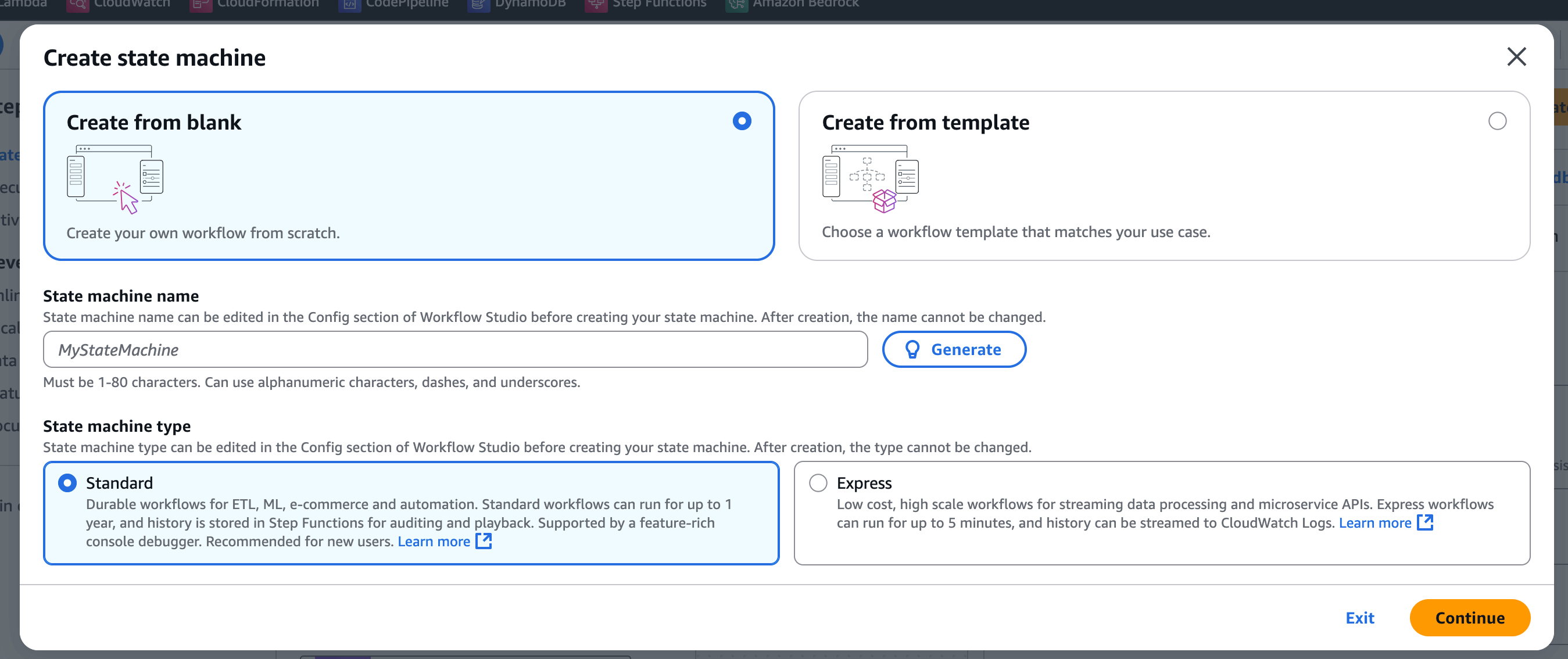
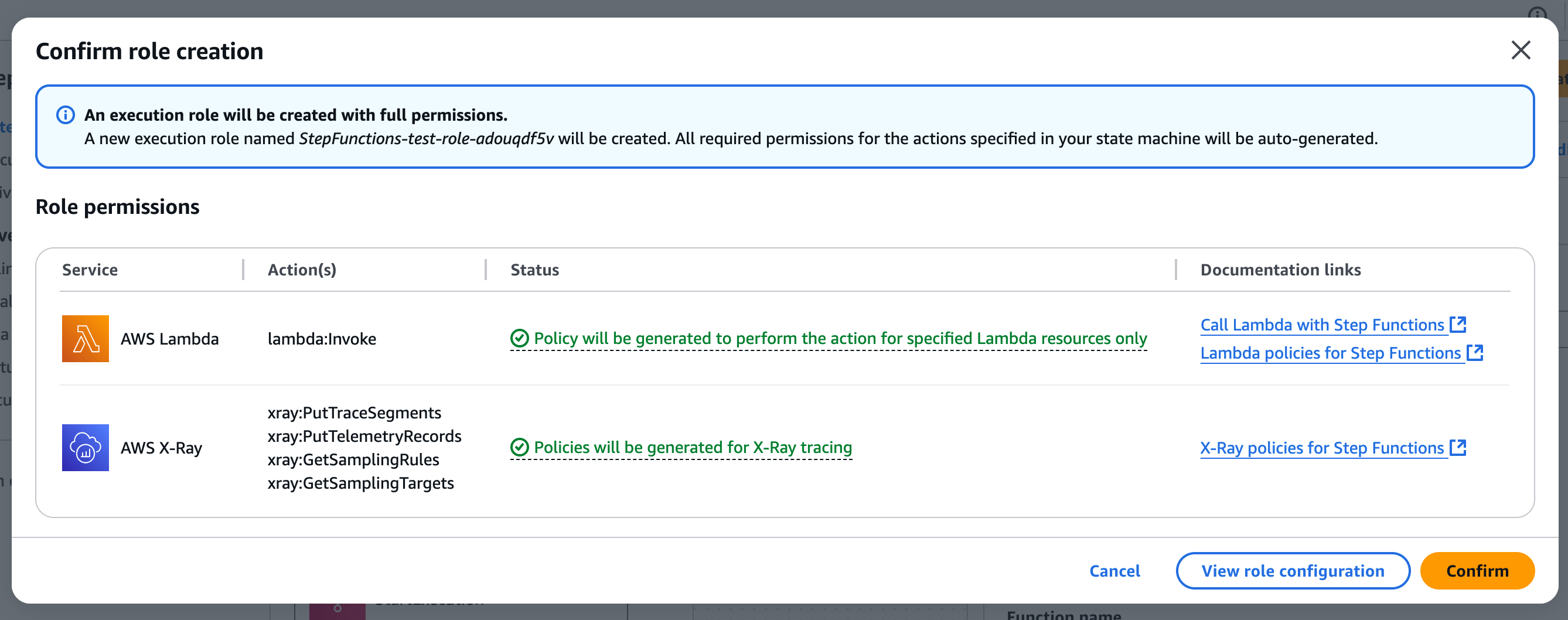
2.1.1. Create from blank
The official documentation has a full section about Workflow Studio, with many examples and detailed information.
Workflow Studio is a low-code visual designer integrated into the Step Functions console. It’s perfect for designing workflows intuitively, especially if you prefer a graphical approach and don’t want to write code from scratch.
Step by step:
- Access the AWS Console: Navigate to the Step Functions service.
- Create a new state machine: Click on “Create state machine.”
- Select Workflow Studio: Choose the option to design your workflow visually.
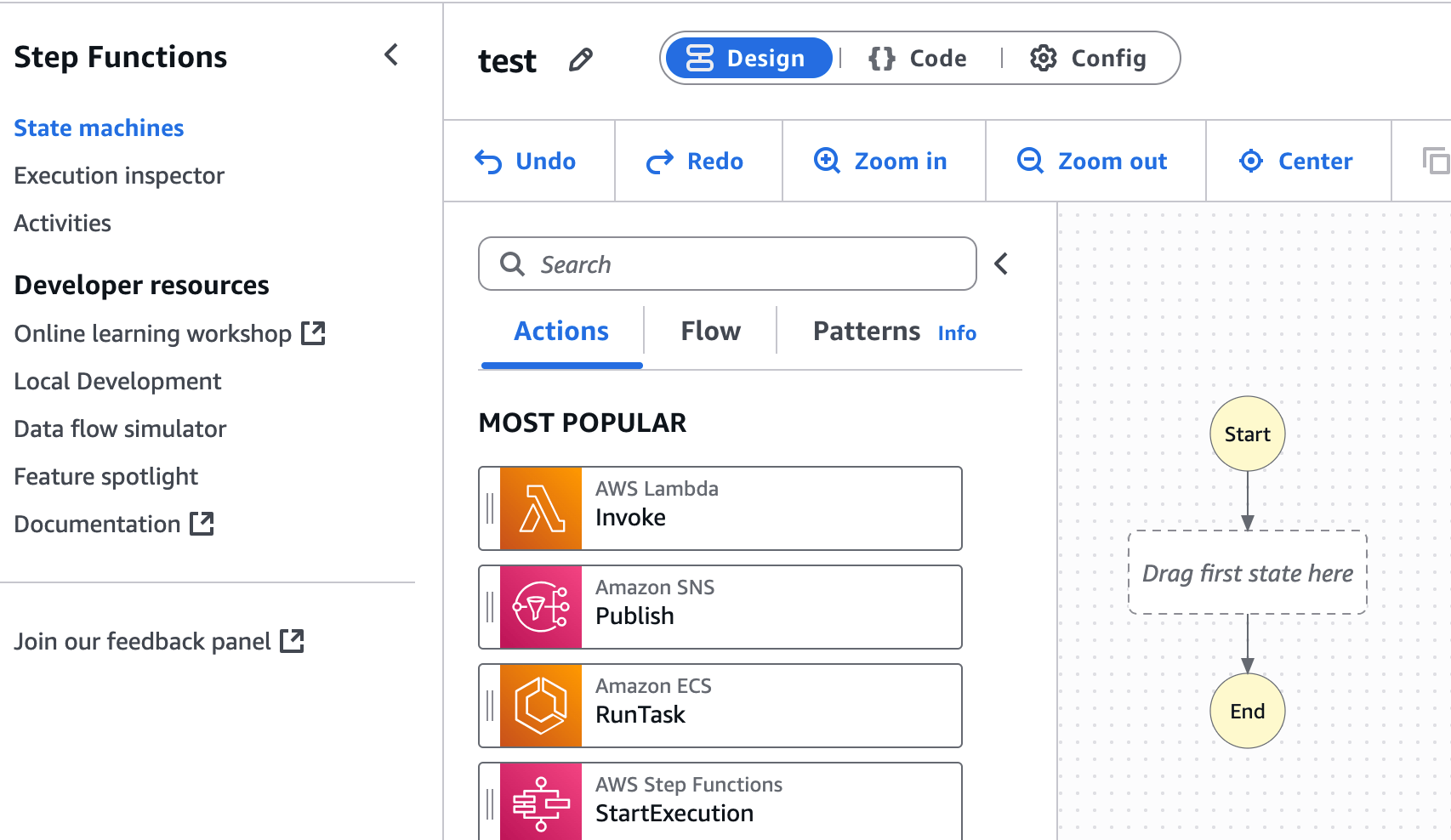
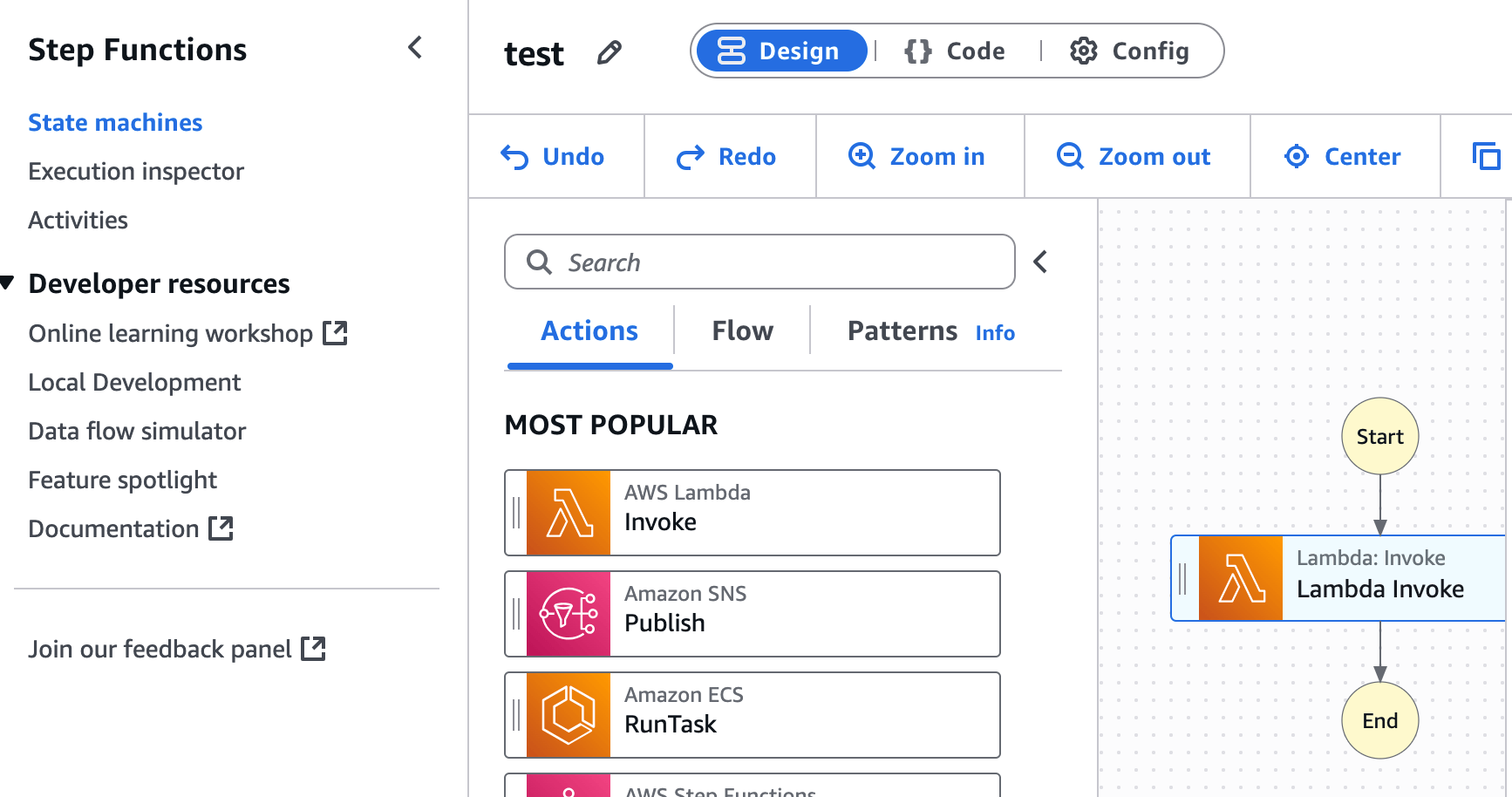
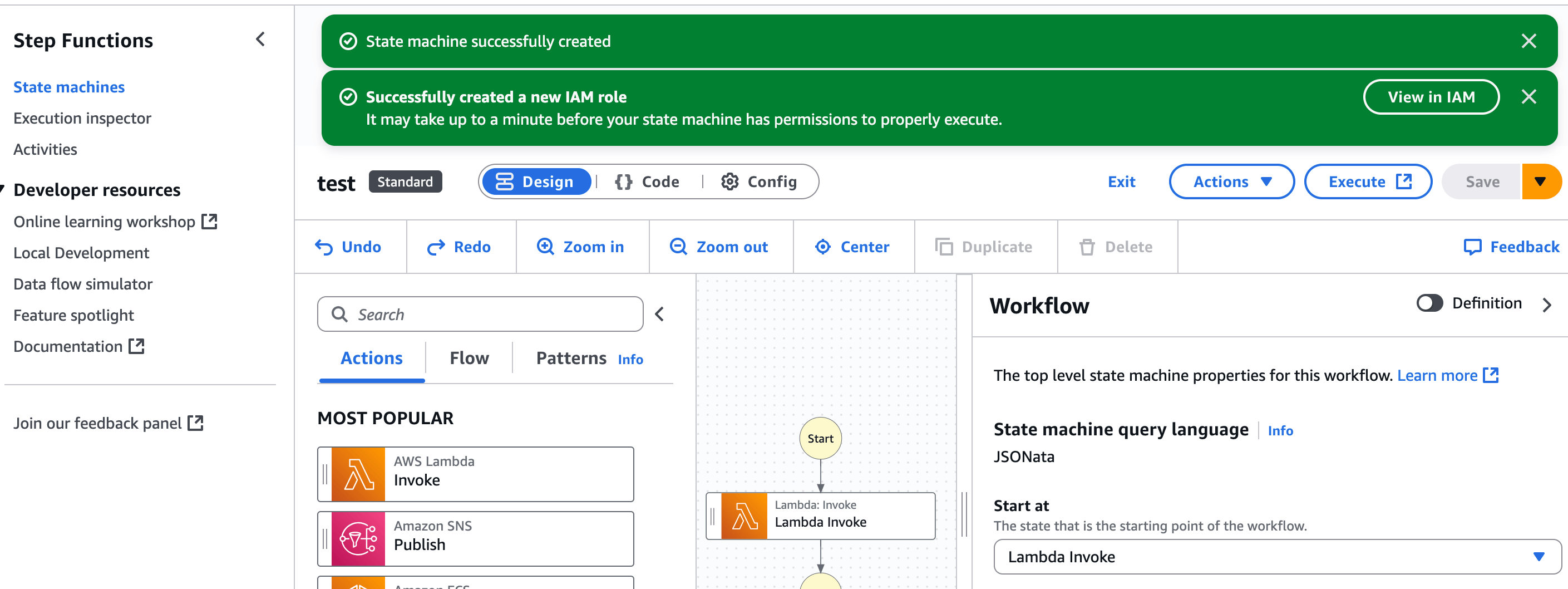
- Drag and drop states: You can drag and drop different types of states (Task, Choice, Parallel, Map, etc.) from the left panel onto the design canvas.
- Configure states: Click on each state to configure its properties, such as the Lambda function to invoke, conditions for branches, etc.
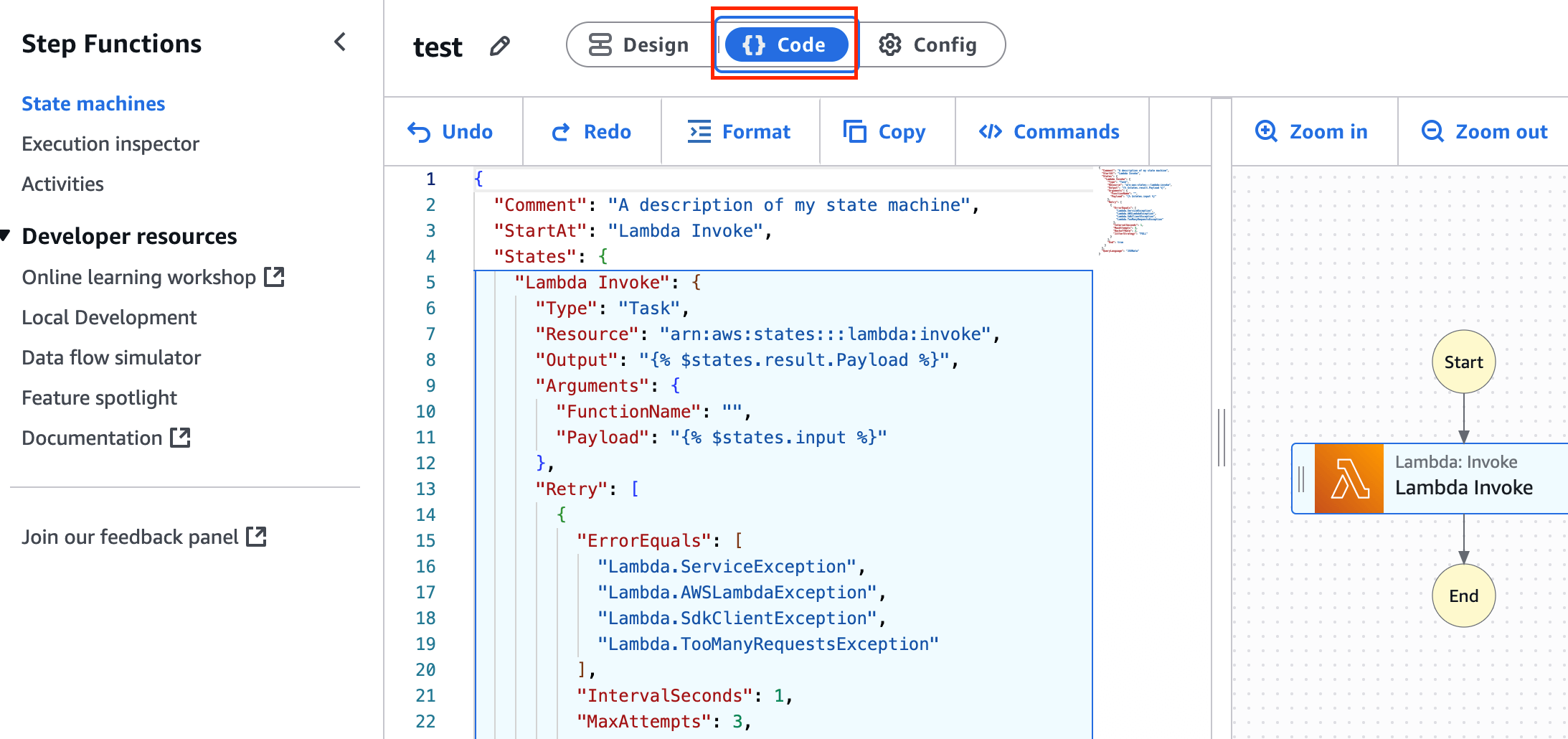
- Visualize the ASL code: As you design, Workflow Studio automatically generates the corresponding Amazon States Language (ASL) code in the right panel.
- Save and deploy: Once you’re satisfied with the design, save your state machine and deploy it.
2.1.2. Create from template
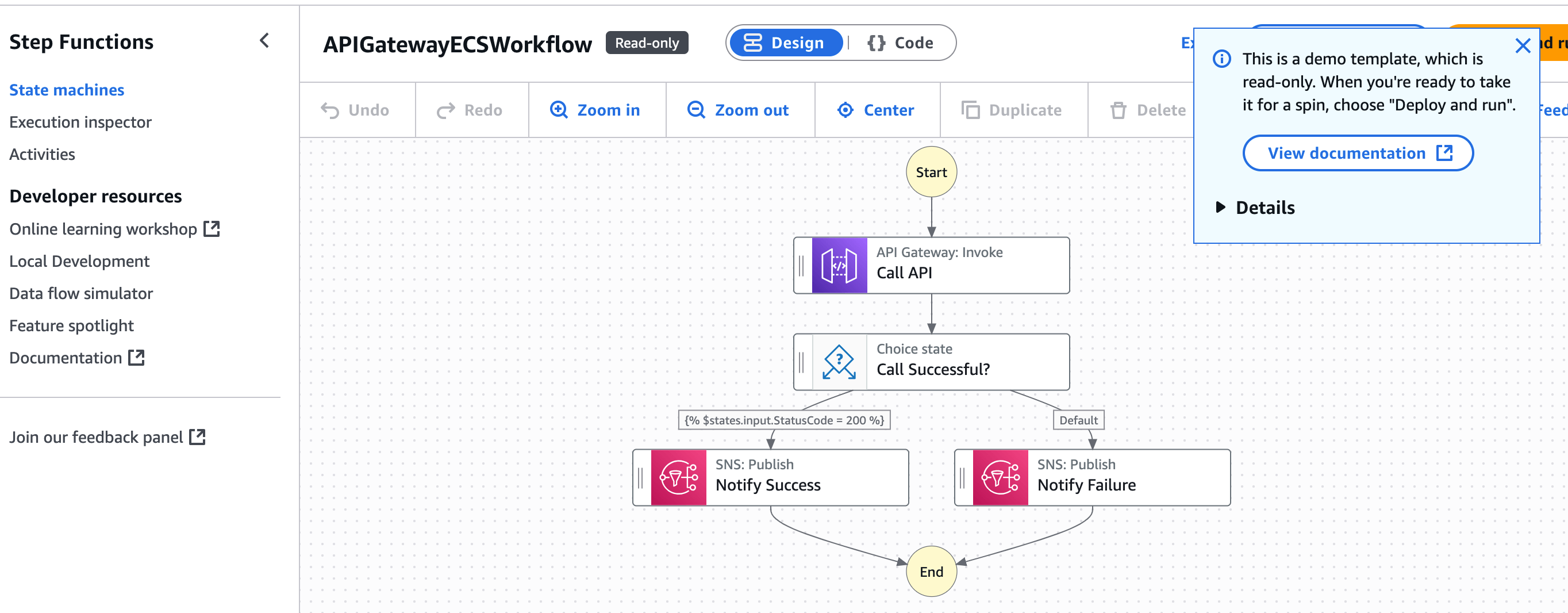
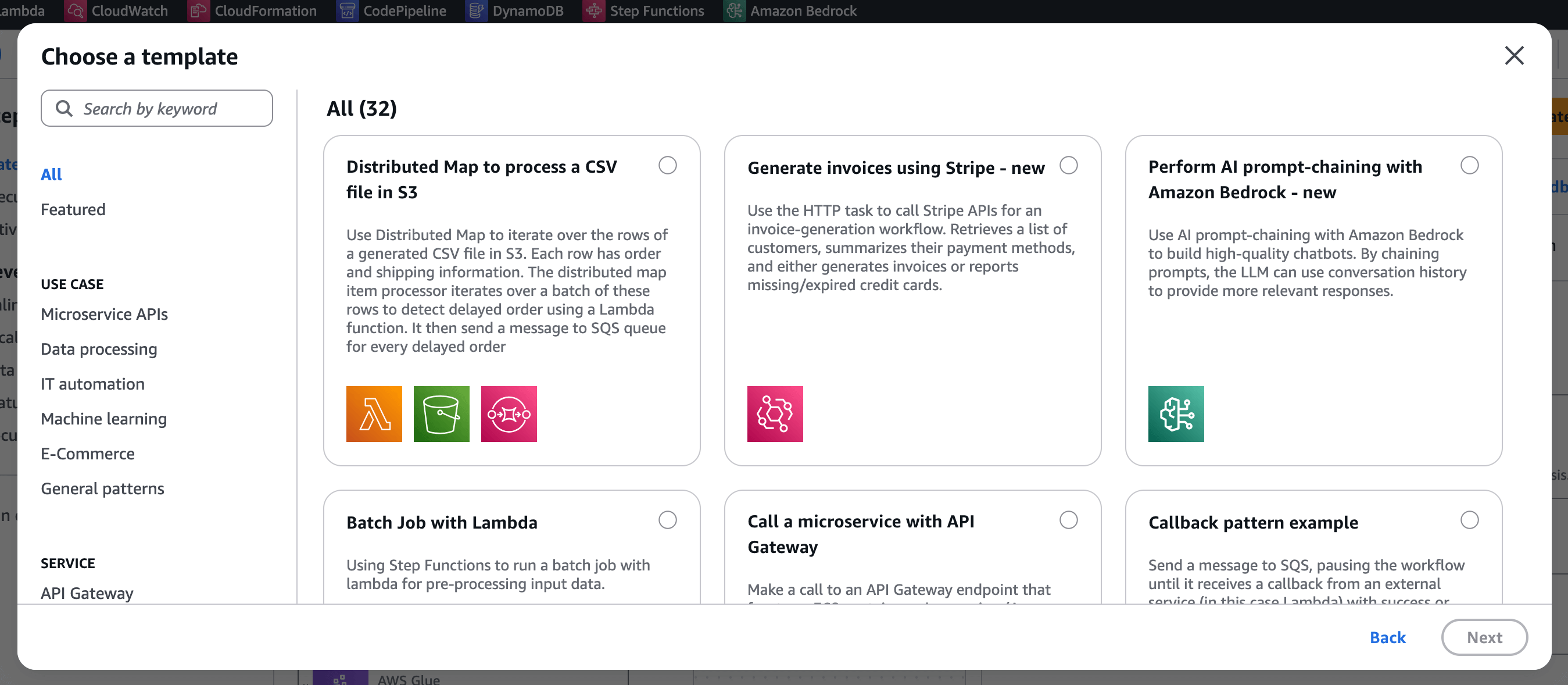
You can also create a Step Function using a Template.
Step by step:
- Access the AWS Console: Navigate to the Step Functions service.
- Create a new state machine: Click on “Create state machine.”
- Select Workflow Studio: Choose the option to design your workflow visually.
- Select Use template when you have chose the option you want.
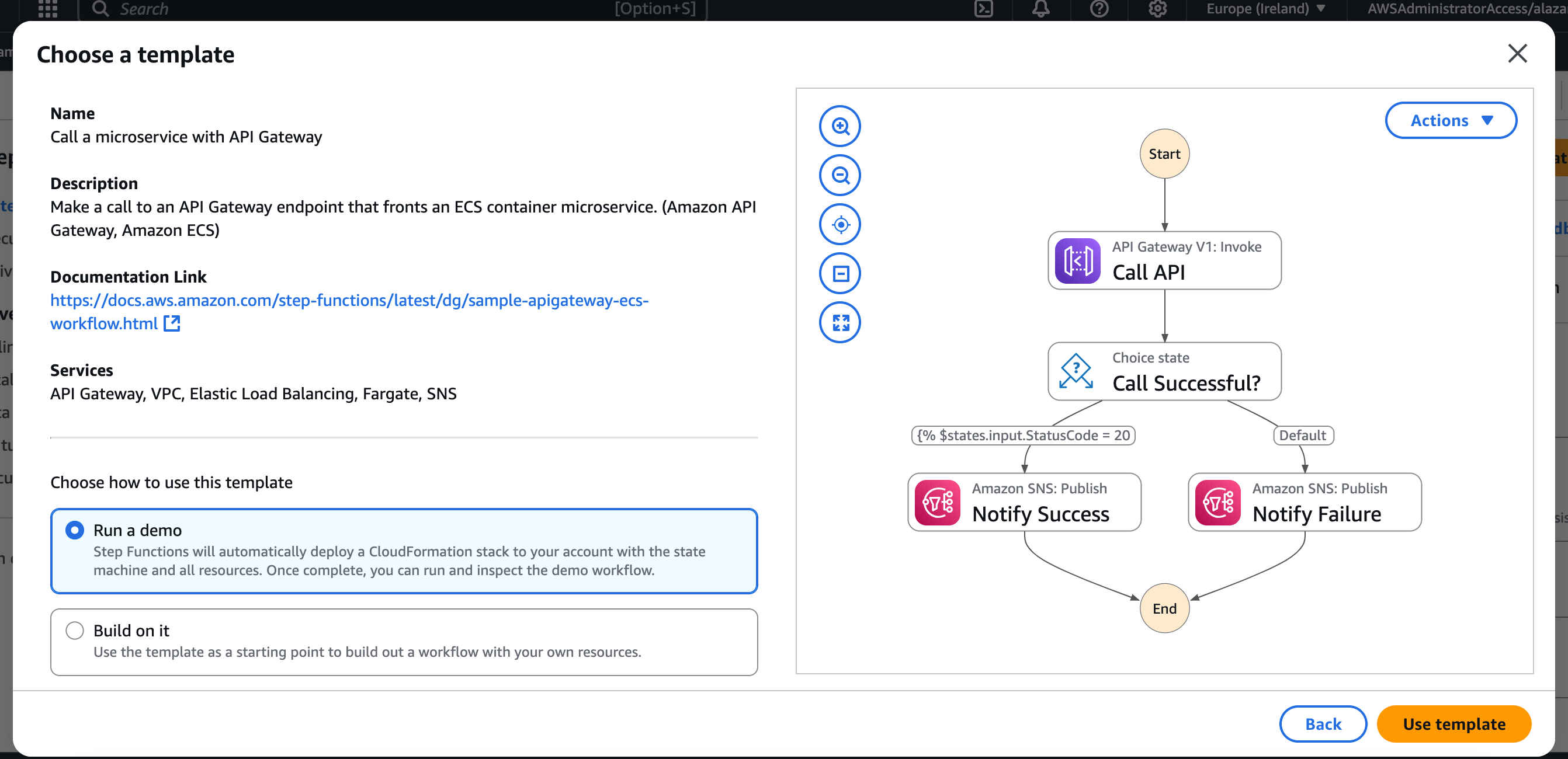
2.1.3. Explaining the Step Function interface
When you access to a Step Function you will see 3 main areas:
- Left: Available states/tasks
- Center: Your visual workflow
- Right: Task configuration
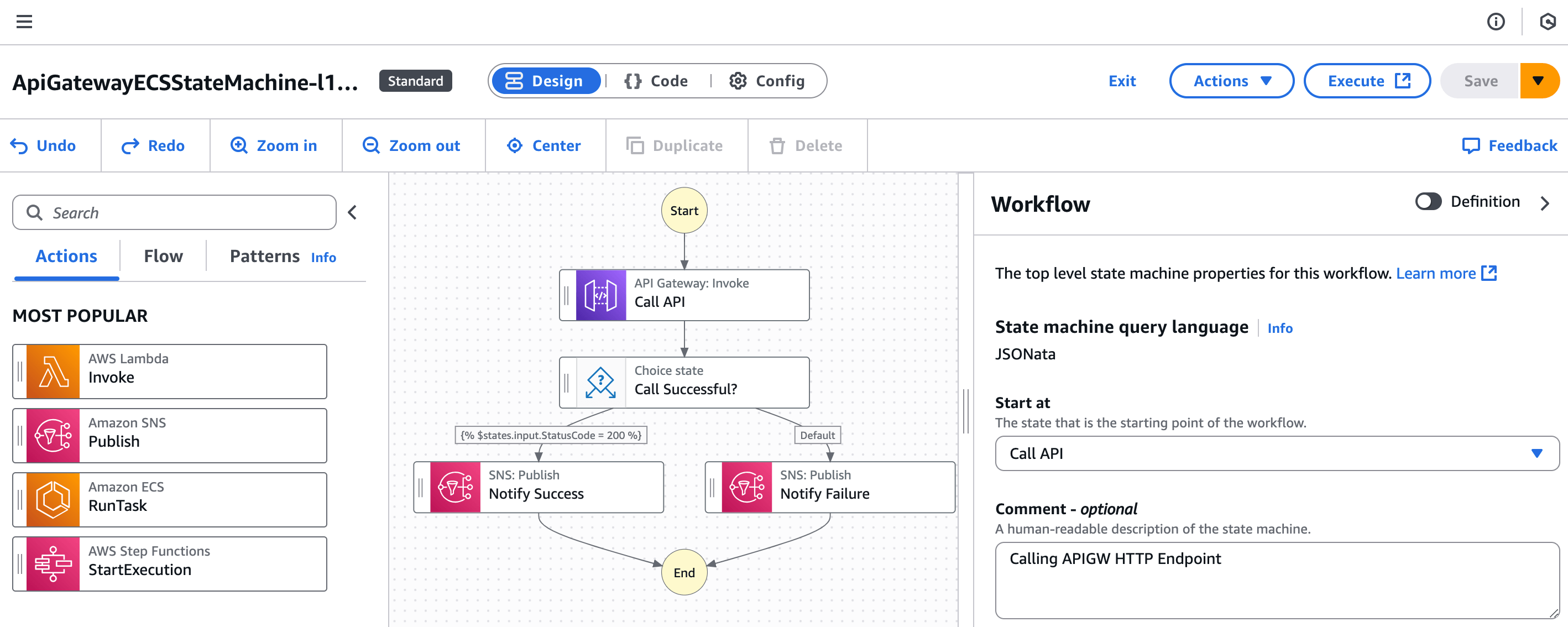
At the top of the screen, you’ll see:
- Workflow name
- Three view modes:
- Design: visual editor (default view)
- Code: ASL code for the workflow
- Config: choose standard/express, set permissions, logging, tracing, versions, and tags

Here is what the ASL code looks like:
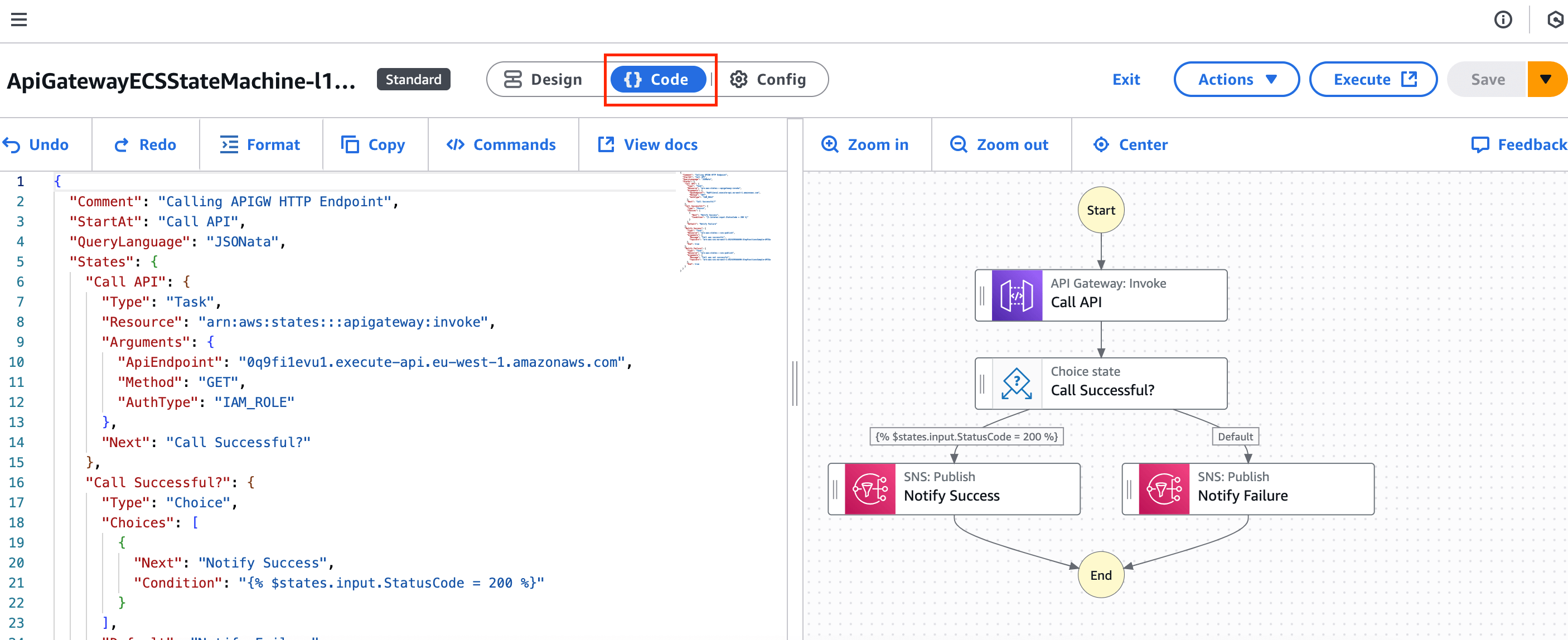
I strongly recommend building your workflows in
design mode, switching tocode mode, and then copying the ASL definition to your IaC templates (AWS SAM makes this super easy).
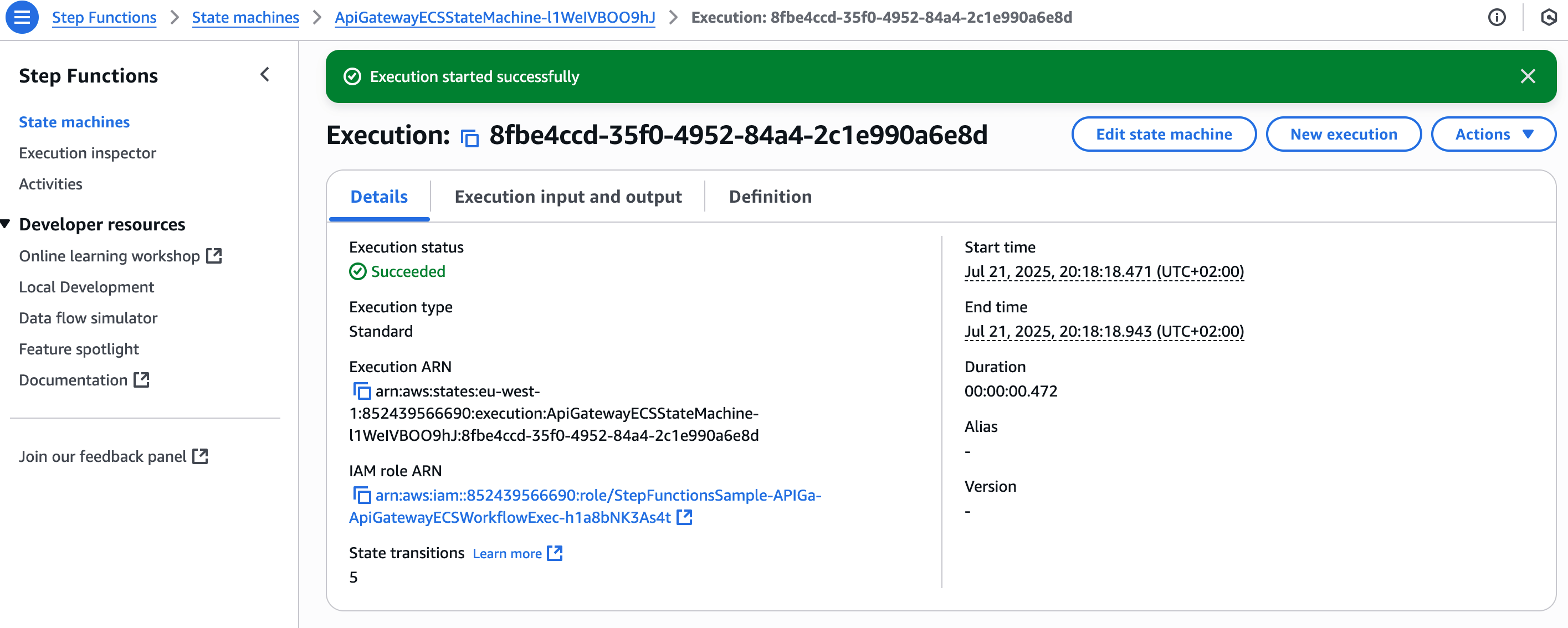
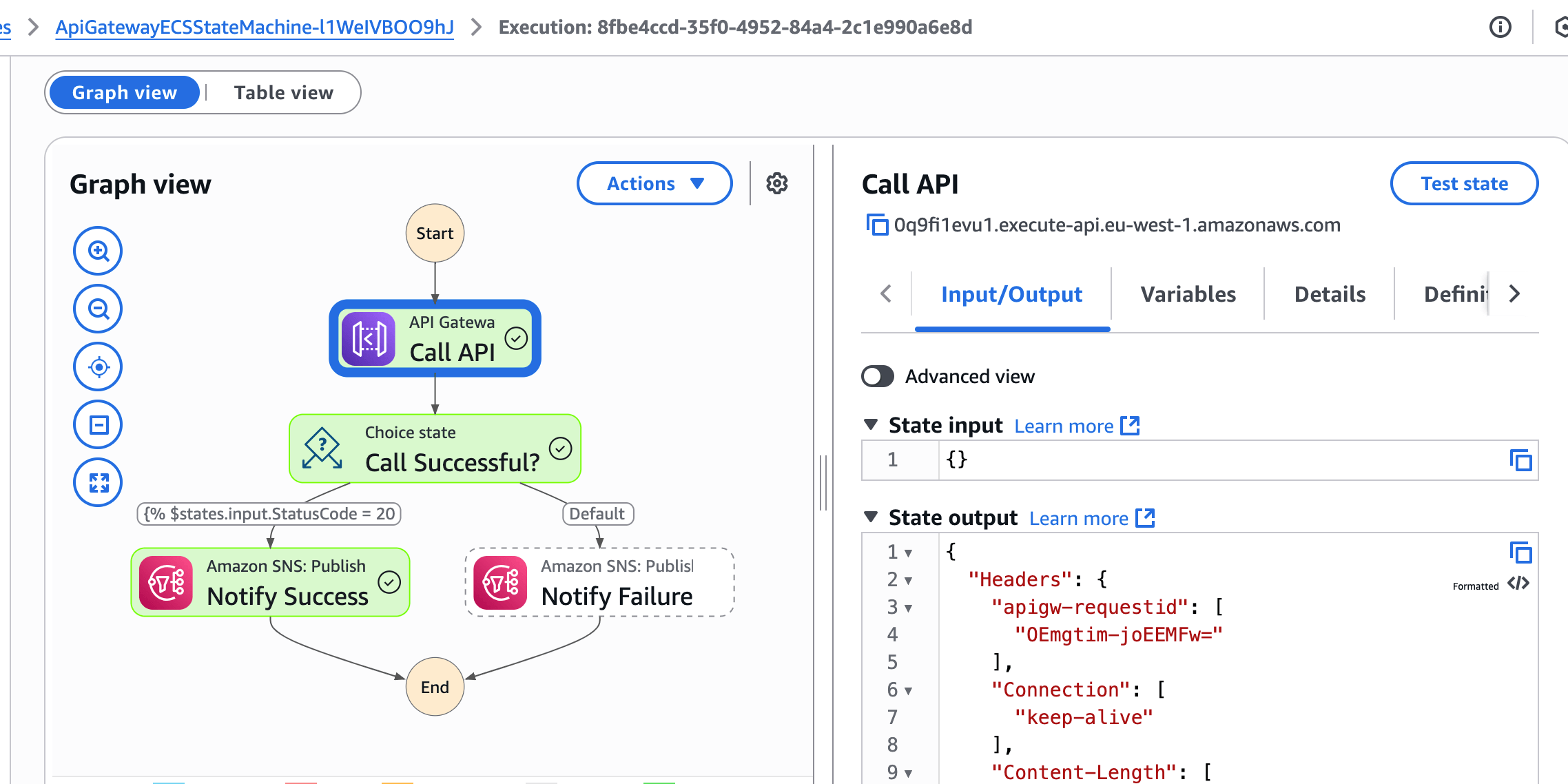
2.1.4. Start execution
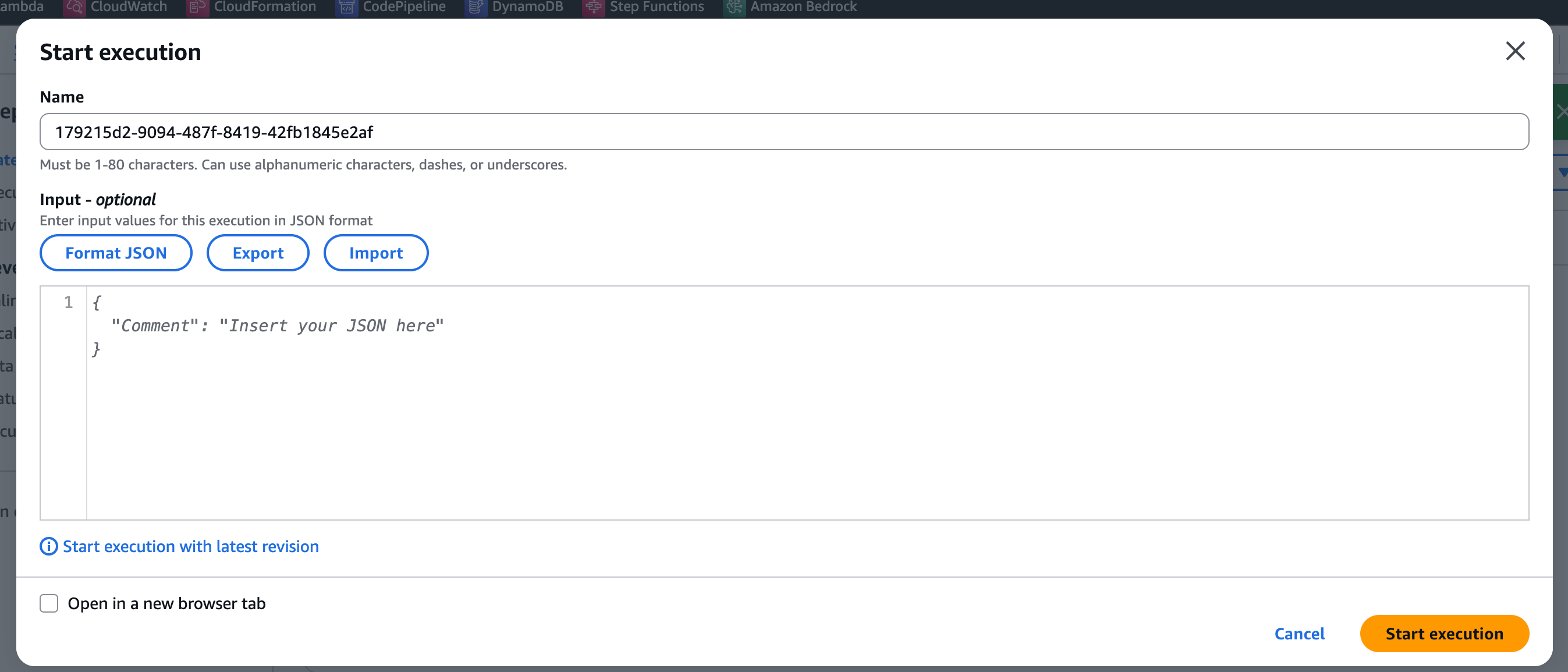
Test a Step Function is very simple.
- Open a Step Function
- Click into “Start execution”
- Add a input (optional field)
- Click “Start execution” to execute
- You will see the result of the execution and you can review visually the status and the logs
2.2 AWS Infrastructure Composer
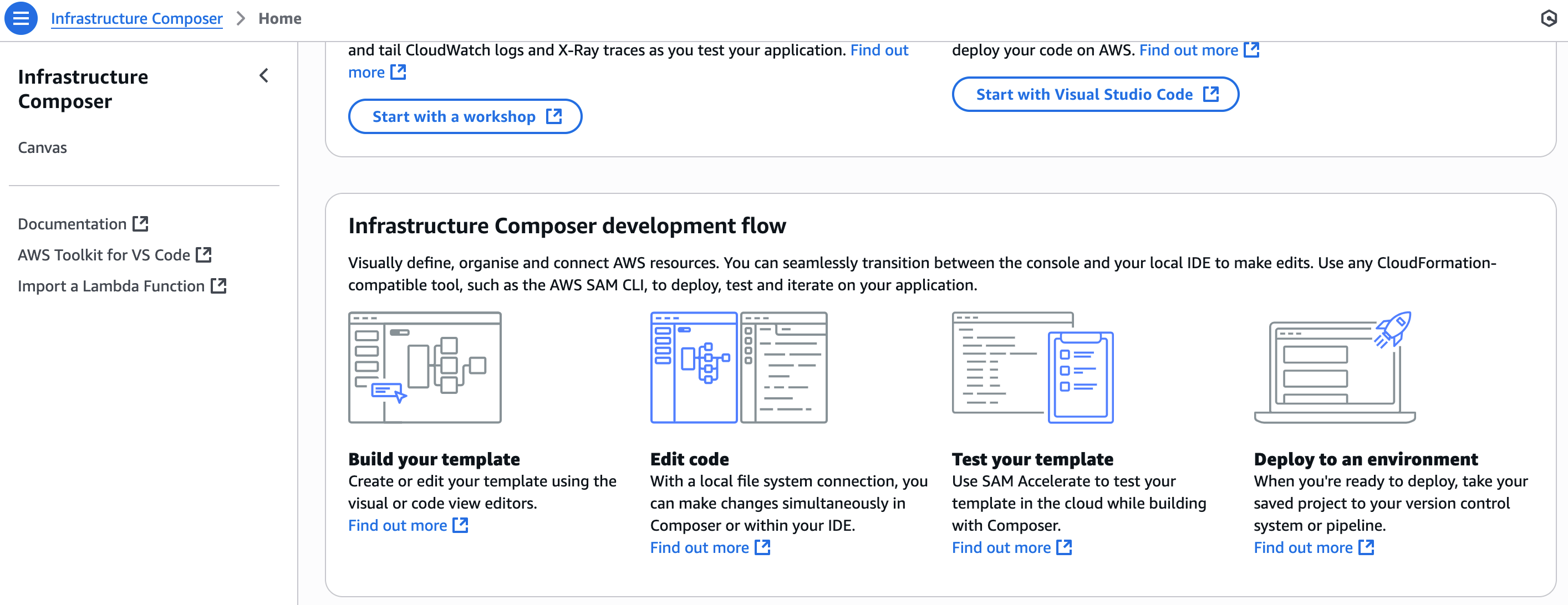
Infrastructure Composer is now available as part of the AWS Toolkit for Visual Studio Code.
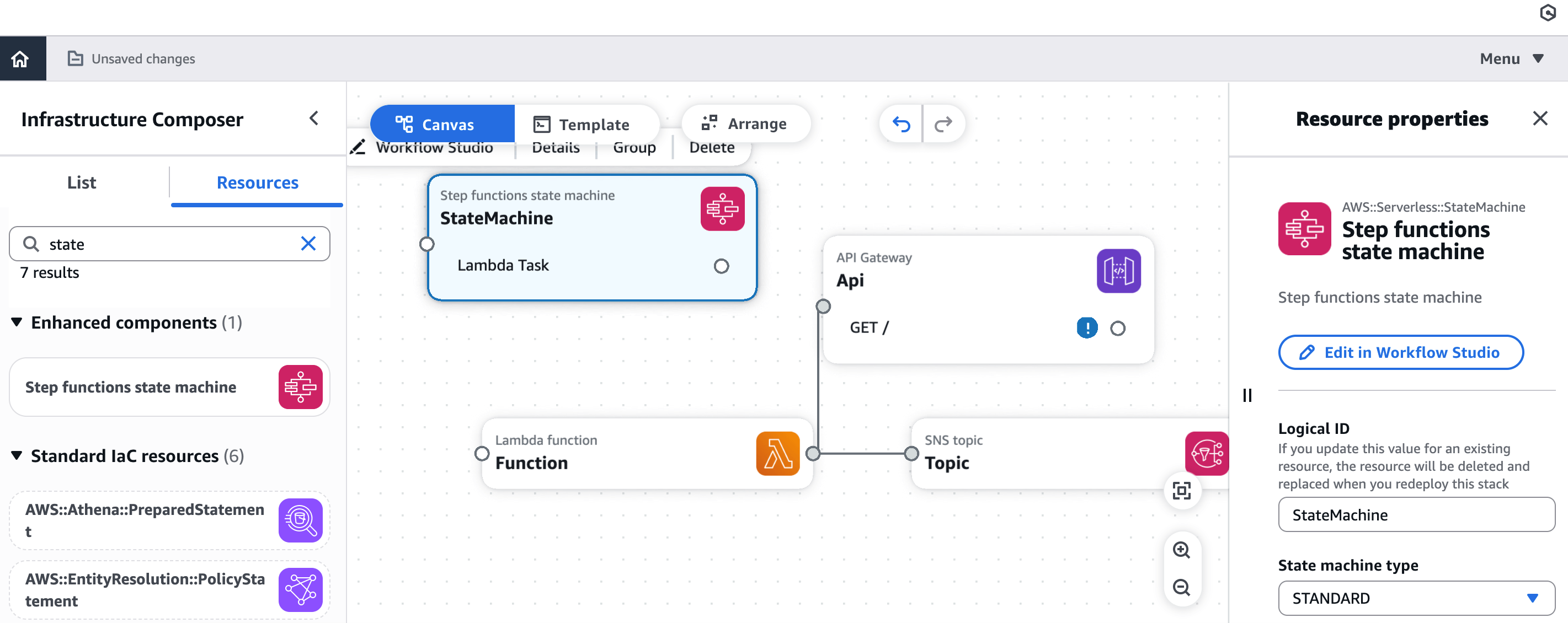
AWS Infrastructure Composer helps you visually compose modern applications and iterate on their architecture design. It’s an excellent option for visualizing and composing entire applications, including Step Functions.
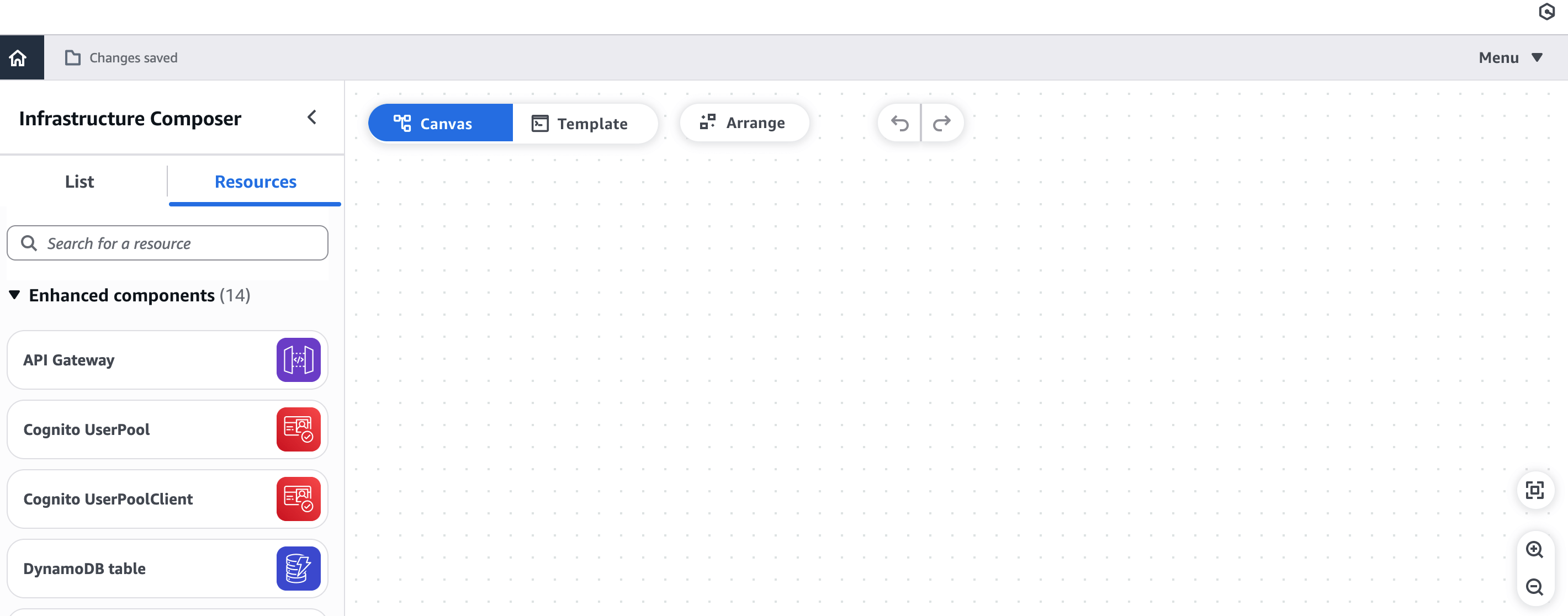
How to do it with this option, step-by-step:
- Access AWS Application Composer: Open the service in the AWS console.
- Create a new project: Start a new project or open an existing one.
- Drag and drop components: From the component palette, drag the “Step Functions State Machine” icon onto the canvas.
- Connect with other services: You can connect your Step Functions state machine with other AWS services by dragging lines between them. For example, you could connect a Lambda function that will be invoked by a state in your Step Function.
- Configure the Step Function: Click on the Step Function component on the canvas. In the properties panel, you can define the structure of your state machine. This often involves directly editing the ASL code within Application Composer or pasting an existing ASL if you already have it.
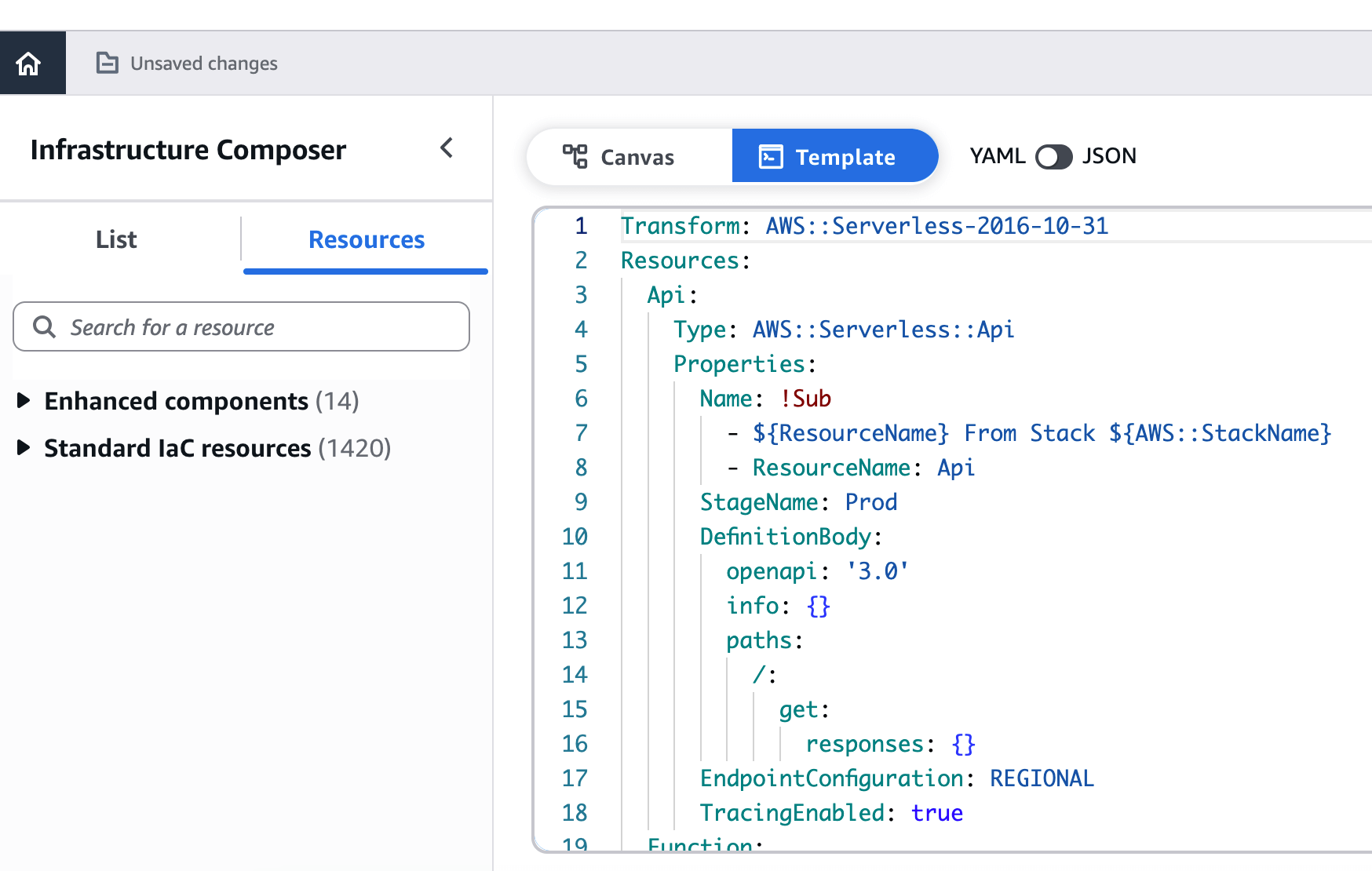
- IaC Generation: Application Composer automatically generates the CloudFormation or SAM code that represents your architecture, including your Step Function definition. This code is shown in a side panel.
- Bi-directional synchronization: One of the big advantages is that you can edit the visual diagram or the IaC code directly, and the changes will be reflected in both.
- Deployment: Once your design is complete and the code is generated, you can download it or deploy it directly from the Application Composer console using CloudFormation.
2.3. Using IaC (Infrastructure as Code)
This is the preferred method for many development teams to manage and version their infrastructure. It allows you to define your Step Function in a text file, which can then be versioned and deployed automatically.
2.3.1. AWS CloudFormation
This is AWS’s native IaC service. You define your Step Function (and other AWS resources) in YAML or JSON templates.
Example:
1
2
3
4
5
6
7
8
9
10
11
12
13
14
15
16
17
18
Resources:
  MyStateMachine:
    Type: AWS::StepFunctions::StateMachine
    Properties:
      StateMachineName: MyWorkflow
      DefinitionString: !Sub |
        {
          "Comment": "A simple Step Function",
          "StartAt": "HelloWorld",
          "States": {
            "HelloWorld": {
              "Type": "Task",
              "Resource": "arn:aws:lambda:REGION:ACCOUNT_ID:function:MyLambdaFunction",
              "End": true
            }
          }
        }
      RoleArn: !GetAtt StateMachineExecutionRole.Arn
2.3.2. AWS SAM (Serverless Application Model)
An extension of CloudFormation optimized for serverless applications. It simplifies the definition of resources like Step Functions, Lambdas, API Gateways, etc.
Example:
1
2
3
4
5
6
7
8
9
10
11
12
13
14
Resources:
  MyWorkflow:
    Type: AWS::Serverless::StateMachine
    Properties:
      DefinitionUri: sfn/statemachine.asl.json # Path to your ASL definition file
      Policies:
        - LambdaInvokePolicy:
            FunctionName: MyLambdaFunction
      Events:
        MyApi:
          Type: Api
          Properties:
            Path: /start-workflow
            Method: post
2.3.3. AWS CDK (Cloud Development Kit)
Lets you define your infrastructure using popular programming languages like TypeScript, Python, Java, .NET, or Go. The CDK then synthesizes this definition into CloudFormation templates. It’s very powerful for programmatically building complex architectural patterns.
Example:
1
2
3
4
5
6
7
8
9
10
11
12
13
14
15
16
17
18
19
20
21
22
23
24
25
import aws_cdk as cdk
from aws_cdk import aws_stepfunctions as sfn
from aws_cdk import aws_stepfunctions_tasks as tasks
from aws_cdk import aws_lambda as lambda_

class MyStepFunctionStack(cdk.Stack):
    def __init__(self, scope: cdk.App, id: str, **kwargs) -> None:
        super().__init__(scope, id, **kwargs)

        my_lambda = lambda_.Function.from_function_arn(
            self, "MyLambdaFunction",
            "arn:aws:lambda:REGION:ACCOUNT_ID:function:MyLambdaFunction"
        )

        task = tasks.LambdaInvoke(self, "InvokeLambda",
            lambda_function=my_lambda,
            payload_response_only=True
        )

        definition = sfn.Chain.start(task)

        sfn.StateMachine(self, "MyStateMachine",
            definition_body=sfn.DefinitionBody.from_chainable(definition),
            state_machine_name="CDKStepFunction"
        )
2.3.4. Terraform
A third-party IaC tool popular for its ability to manage infrastructure across multiple cloud providers.
Example:
1
2
3
4
5
6
7
8
9
10
11
12
13
14
15
16
resource "aws_sfn_state_machine" "sfn_machine" {
  name     = "MyTerraformStateMachine"
  role_arn = aws_iam_role.sfn_role.arn

  definition = jsonencode({
    Comment = "A simple Terraform Step Function"
    StartAt = "HelloWorld"
    States = {
      HelloWorld = {
        Type     = "Task"
        Resource = "arn:aws:lambda:${data.aws_region.current.name}:${data.aws_caller_identity.current.account_id}:function:MyLambdaFunction"
        End      = true
      }
    }
  })
}
3. When and Why to Migrate from Lambda to Step Functions
You may be wondering: when does it actually make sense to switch?
When to Migrate
- Your Lambda logic is growing and hard to manage.
- You need state across multiple steps (like waiting between retries).
- Error handling is becoming complex, and you want to avoid rewriting catch logic everywhere.
- You’re dealing with orchestration, not business logic.
- Your workloads exceed Lambda limits, in duration or retries.
Why Migrate
- Visual workflows simplify understanding and onboarding.
- Built-in error handling and retries.
- Direct integrations with many AWS services.
- Less glue code, fewer edge cases.
- Easier to observe and debug (CloudWatch, X-Ray, execution history).
- Cleaner, more maintainable architecture.
Use Step Functions for coordination and Lambda for computation.
4. Common Patterns for Step Functions
AWS Step Functions provide a visual and declarative way to model complex logic. While you can use them for almost anything, there are certain patterns that show up consistently in modern architectures. Here are the most common ones, with more detail and real-world examples:
- State Machine Pattern
- The most basic, and most powerful pattern. You design a state machine visually, with well-defined steps: tasks, decisions, parallel flows, etc. Great for modeling processes step by step, like a validation chain or a complex automation.
- Example: A user onboarding flow where each step (registration, email validation, profile creation, notification) is a state.
- Microservices Orchestration
- In a microservices architecture, each service does one thing well. But someone needs to orchestrate the whole process. That’s where Step Functions shine. You can call different services (via Lambda, HTTP, SQS…) and control the flow.
- Example: An e-commerce checkout that runs stock validation, pricing, payment, shipping, and customer notification. Each step can be a separate service.
- Event-Driven Processing
- You can trigger flows automatically based on events from EventBridge, SNS, or even S3. This lets you build reactive and decoupled systems.
- Example: Every time a file is uploaded to S3, a flow starts that validates, transforms, and stores the data in a database.
- Saga Pattern (Compensating Transactions)
- Perfect for distributed systems where you need eventual consistency. If something fails mid-process, you can trigger compensating tasks to “undo” previous steps.
- Example: If the payment was successful but the order couldn’t be fulfilled, automatically trigger a refund.
- Batch Processing
- Step Functions aren’t a big data engine, but they can coordinate parallel jobs, launch ETL processes, and handle item-level errors.
- Example: A daily pipeline that reads files from S3, transforms them with AWS Glue, and loads them into Redshift.
- Nested Workflows (Modularization)
- You can call other state machines from within a main one. This promotes reusability, avoids duplication, and keeps your flows clean.
- Example: A fraud analysis workflow that calls secondary flows to run different types of validations.
- Approval Workflows (Human-in-the-loop)
- Some processes require human interaction, like approvals or manual checks. You can pause the flow using a
TaskToken, and resume it once there’s a response. - Example: An expense approval system that waits for a manager’s input before continuing.
- Some processes require human interaction, like approvals or manual checks. You can pause the flow using a
- Fan-out/Fan-in with Map
- Run multiple tasks in parallel across a list (fan-out), wait for all to complete, then continue (fan-in). Great for processing data collections.
- Example: Sending notifications across multiple channels (email, SMS, push) to a list of users.
- Hybrid Orchestration
- Combine Step Functions with EventBridge and Lambdas to create partially defined, partially dynamic flows. Useful when steps vary depending on the event or customer.
- Example: In a multi-tenant platform, each tenant might have a slightly different flow with common core logic.
- Error Handling + Retries + Dead Letter Flows
- Not just a pattern, it’s a philosophy. Define clear retry policies and use
Catchblocks to redirect failed flows to error-handling or notifications. - Example: If a task fails three times, notify a support team and move the data to a dead-letter queue.
- Not just a pattern, it’s a philosophy. Define clear retry policies and use
5. Best Practices from the Field
These are hard-earned lessons from real-world projects (some learned the hard way):
- Comment your ASL (Amazon States Language)
- Use the
Commentfield in your states to explain what each one does. You’ll thank yourself in three months when you’re debugging an old flow.
- Use the
- Keep it small and clear
- Each Lambda should do one thing well. Don’t cram orchestration logic into the Lambda itself. Let Step Functions coordinate and delegate.
- Keep payloads light
- Avoid passing large JSON objects between states. Store heavy data in S3 or DynamoDB and just pass references. It’ll reduce cost, improve performance, and avoid size errors.
- Control data flow
- Use
InputPath,ResultPath, andParametersto decide what comes in, what goes out, and what moves to the next state. - Tip:
ResultPath: "$.result"helps you keep the original input and add the result under a new key.
- Use
- Avoid unnecessary Lambdas
- If you just need to route, transform simple data, or apply conditions, use
Pass,Choice, or evenMap. It’s cleaner and cheaper.
- If you just need to route, transform simple data, or apply conditions, use
- Parallelize smartly
- Use
ParallelandMapto run tasks at the same time or iterate over lists. It’s more robust than trying to build loops or recursion manually.
- Use
- Full observability
- Enable CloudWatch logs, use X-Ray for traces, and always check execution history to know exactly what happened and where.
- Set timeouts on every task
- Always. No exceptions. Avoid zombie executions that consume resources forever.
- Use nested workflows for reusability
- If part of your logic is reused in several flows, extract it into its own Step Function. Easier to maintain and test.
- Design for idempotency
- If something might fail and be retried, make sure your Lambda or external API can safely handle duplicate calls.
- Use clear, consistent names
- Don’t call your states
Task1,Task2, etc. Use meaningful names likeValidatePaymentResponse. It makes tracing and debugging way easier.
- Don’t call your states
- Version your workflows
- If you’re iterating, keep old versions of your
.asl.jsonfiles or use naming conventions likeMyFlow_v1,MyFlow_v2. It makes rollback and testing simpler.
- If you’re iterating, keep old versions of your
- Leverage
CatchandRetryeffectively- Define specific errors and handle them accordingly. Avoid using
ErrorEquals: ["States.ALL"]if you can catch specific ones.
- Define specific errors and handle them accordingly. Avoid using
- Simulate before deploying
- Use the Step Functions console simulator or a dry-run setup to ensure your flow behaves as expected before launching to production.
- Stick to least-privilege IAM
- Step Functions need permissions to invoke Lambdas, access S3, etc. Don’t go with
*:*. Define tight IAM policies and, ideally, use a dedicated role per workflow.
- Step Functions need permissions to invoke Lambdas, access S3, etc. Don’t go with
6. Common Pitfalls to Avoid
Here are mistakes I’ve made or seen others make:
- ❌ Using Step Functions for sub-second latency workflows
- Step Functions aren’t real-time. They’re fast, but not built for gaming, trading, or other latency-critical use cases.
- ❌ Using Step Functions as a scheduler
- If you just want to run something every X minutes or hours, use EventBridge Scheduler or CloudWatch Events instead.
- ❌ Forgetting timeouts
- Without a timeout, a task can hang forever if a Lambda fails silently. Set a
TimeoutSecondsfor every task, always.
- Without a timeout, a task can hang forever if a Lambda fails silently. Set a
- ❌ Putting too much into one workflow
- When a flow has too many paths, decisions, and steps, split it. Apply separation of concerns just like in code.
- ❌ Ignoring cost
- While cheap for many cases, Step Functions can get expensive if you have millions of executions with many steps. Monitor and optimize.
- ❌ Passing too much context between states
- If each state carries the entire execution history, payloads grow fast. Use
ResultPathandInputPathwisely.
- If each state carries the entire execution history, payloads grow fast. Use
- ❌ Not cleaning up failed executions
- Failed flows stay in the system. They don’t cost much, but can clutter your observability tools. Set alerts or create a cleanup mechanism if needed.
- ❌ Not documenting your flows
- A 300-line
.asl.jsonwith no comments is hard to understand, even if you wrote it. UseComment, diagrams, or external notes to keep it maintainable.
- A 300-line
Wrapping Up
AWS Step Functions give you the power to build clean, fault-tolerant workflows that are easier to maintain than sprawling Lambda spaghetti code. But to get the most out of it, you need to think like a workflow designer, not just a developer.
Plan your states. Keep your workflows lean. Make each step do one thing well.
Step Functions are not magic, but they might just save you from the chaos of growing systems.