
Getting Started with AWS Step Functions: The Serverless Workflow You Need
Discover how AWS Step Functions can help you orchestrate serverless workflows effortlessly. In this article, I'll walk you through the basics, real-world examples, and why Step Functions might just be the missing piece in your serverless architecture.
AWS Step Functions
Master AWS Step Functions for serverless workflow orchestration, from basic state machines to advanced patterns and error handling.
2 articles
This series evolves from an earlier article I wrote more than a year ago: Mastering Serverless Workflows with AWS Step Functions. Since then, I’ve gained deeper insights and hands-on experience with AWS Step Functions, leading to a more comprehensive understanding of their capabilities and best practices. In this updated series, I aim to share these enhanced perspectives, offering practical information, limitations, and tips based on real-world experience. Whether you’re just starting or looking to refine your skills, there’s something here for you.
1. Introduction
If you’re building serverless applications on AWS, you probably started with a few Lambda functions that worked great. But soon, your Lambda spaghetti gets out of control, or your microservices start behaving like a bunch of wild teenagers with no supervision. That’s when orchestration saves the day.
AWS Step Functions may not be new or trendy, but it’s a reliable tool that helps you design scalable, fault-tolerant workflows for your serverless architecture.
Don’t overlook Step Functions just because it’s not the newest tool. Its strength is in
simplifying complexitybehind the scenes.
2. What is AWS Step Functions
AWS Step Functions is a serverless orchestration service that lets you define an application workflow as a series of event-driven steps.
Through visual workflows, you can design and run flows that stitch together services such as AWS Lambda, Amazon SNS, Amazon DynamoDB, and more, creating rich applications without managing infrastructure.
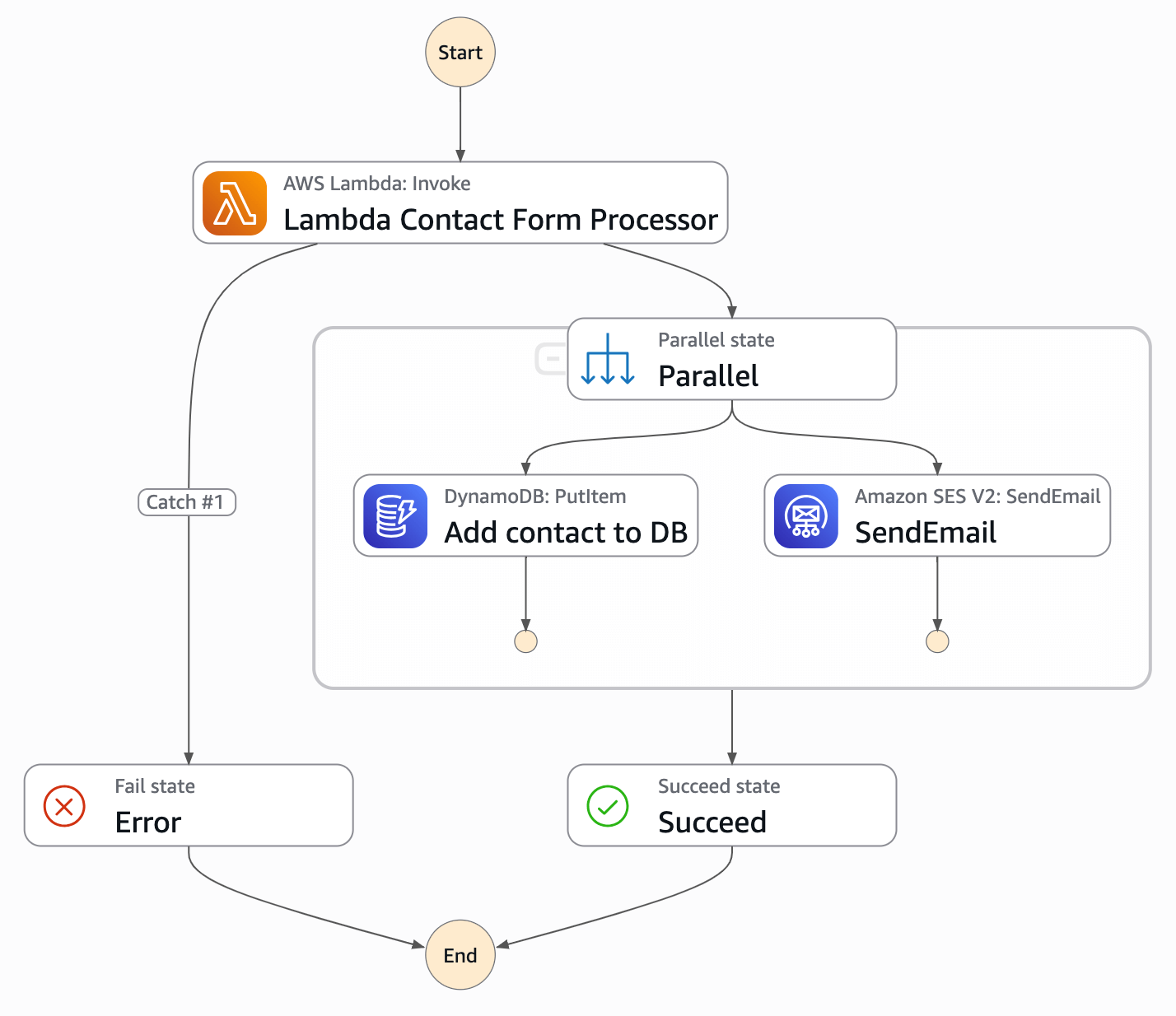
Here’s an example of a Step Function I implemented for my blog:
2.1. Key Features
- Visual Workflow Management to visualize your application’s architecture and monitor executions.
- Serverless by Nature: No infrastructure to manage. Focus on building, not maintaining.
- Error Handling and Retries: Built-in logic for retries and catching errors gracefully.
- AWS Integrations: Easily coordinate services like Lambda, DynamoDB, ECS, EventBridge, and more.
- Execution History: Full visibility into the flow and state of your processes.
2.2. Two Types of Workflows
Step Functions offers two types of workflows:
| Feature | Standard Workflow | Express Workflow |
|---|---|---|
| Duration | Up to 1 year | Up to 5 minutes |
| Pricing Model | Per transition (higher) | Per request & duration (cheaper) |
| Use Case | Long-running, complex | High-volume, short-lived |
| Observability | CloudWatch + full X-Ray | CloudWatch + limited X-Ray |
You can mix both types and start an Express workflow from a Standard one.
More information about the differences in the official documentation here.
2.3 When You Might Not Need It
Step Functions is powerful, but not always necessary. If you’re building a simple app or a few isolated Lambda functions, orchestration may add more complexity than value.
Here are some cases where you might skip it:
- Single-step logic: A single Lambda function that does everything cleanly doesn’t need orchestration.
- Extremely low-latency use cases: Step Functions introduce slight overhead; for ultra-fast responses, a direct call might be better.
- High-frequency invocations with very short steps: If you’re calling a small Lambda 10,000 times a second for under 50ms, Express Workflows could work, but sometimes a Kinesis or EventBridge pipe is more efficient.
- You need full control of state and retries: Step Functions handle this for you, but in some cases, you might prefer doing it manually (e.g. with a custom state machine).
Start simple. Don’t use orchestration just because you can. Use it when you need order, reliability, and clarity.
2.4. When and What to Automate with Step Functions
Step Functions shine when your app needs to orchestrate multiple steps or services with reliability and visibility. Typical automation includes:
- Microservice orchestration
- Long-running workflows that can span minutes or days
- Event-driven data pipelines triggered by events or schedules
- Multi-step request processing with validations
- Human-in-the-loop approvals and decision points
- On-demand or scheduled report generation
If you imagine your process as a flowchart, Step Functions probably is the right tool for you.
3. Why Step Functions Make Your Life Easier
You don’t need AWS Step Functions for everything. But when your architecture grows beyond simple Lambda functions, orchestration becomes essential to keep things manageable.
Here’s why Step Functions are valuable:
- Orchestrate AWS services without writing glue code
- Built-in visual workflows and full execution history
- Replace custom retry logic with built-in error handling
- Fine-grained IAM permissions for secure access control
- Pay per use with automatic scaling
- Fully managed and serverless (no infrastructure to maintain)
Step Functions removes extra code and lets you focus on your business logic.
4. Real-World Example: Refactoring a Lambda into AWS Step Functions
Here’s a real case from my blog:
I originally used a single Lambda function to do all the heavy lifting:
- Validate the input data
- Add contact info to DynamoDB
- Send an email via SES
- Return a success or failure response
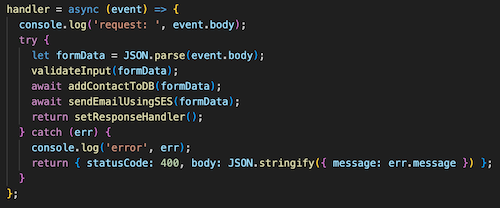
Then I refactored it to use Step Functions:
- Created a state machine to orchestrate the flow
- Delegated input validation and processing to a dedicated Lambda
- Used native service integrations with DynamoDB and SES
- Added error handling and visibility
Now it’s simpler to monitor, update, and debug:
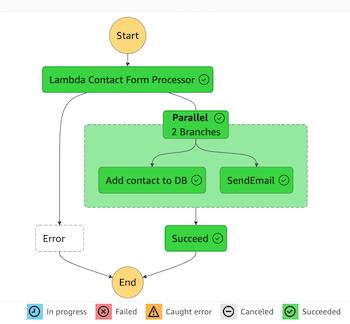
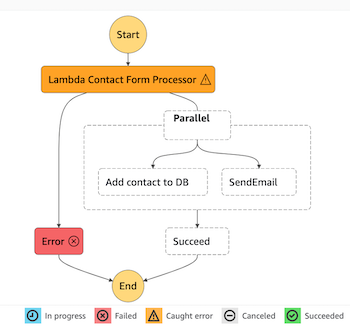
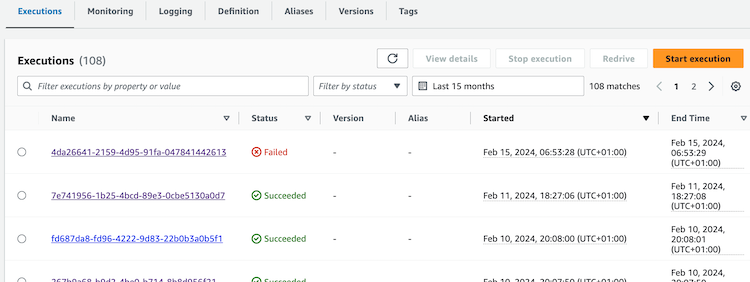
Try creating your own flow using one of the built-in Step Functions templates!
5. How Step Functions Work (The Basics)
Each Step Functions workflow is based on states, defined in the Amazon States Language (ASL). You define a state machine, deploy it, and trigger it.
5.1. The Basics
- Define your flow using JSON/YAML or Workflow Studio
- Use built-in states:
Task,Choice,Map,Parallel,Wait, etc. - Each step can call a Lambda, another service, or even another Step Function
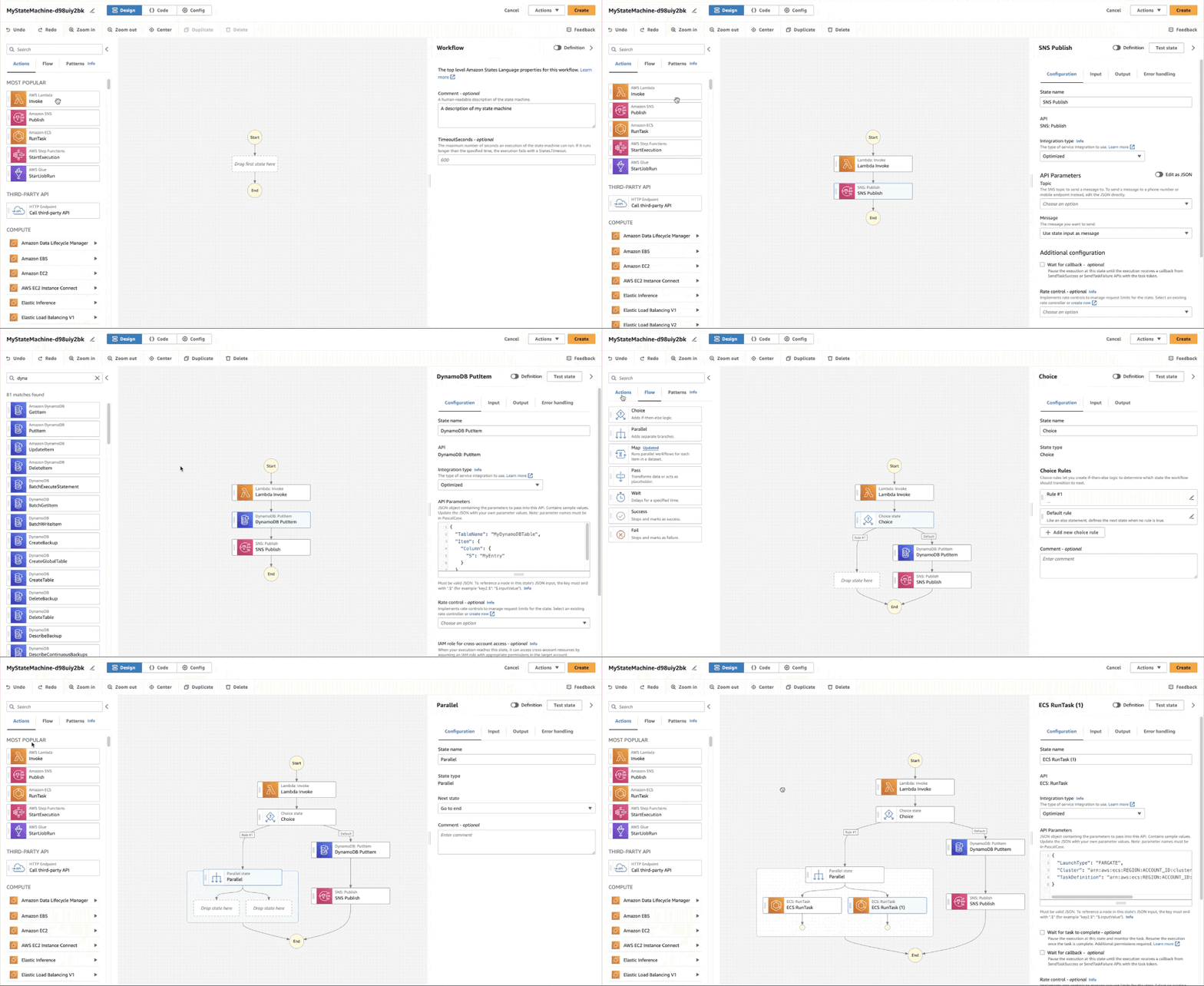
If the animation has stopped, click the image to replay.
5.2. Core Concepts
Workflow(also called state machine): A series of coordinated steps that reflect a business processStates: Each step in the process; can do work, make decisions, or waitTasks: Units of work (e.g., calling a Lambda function or sending a message)Transitions: Define what comes next after a state finishesService Integrations: Native calls to other AWS services like DynamoDB, ECS, or SNS
6. Why You Should Start Using Step Functions Today
AWS Step Functions helps you remove complexity and bring order to your serverless applications. It gives you structure, visibility, and error handling out of the box. All while staying serverless and fully managed.
Whether you’re coordinating microservices, building data pipelines, or adding human approvals, Step Functions provides a scalable, maintainable, and observable solution.
So, if your architecture feels chaotic or you want to boost reliability and visibility, give Step Functions a try. Your future self will thank you.
In the next article AWS Step Functions in Action: Build, Migrate, and Simplify Your Serverless Architecture I will explain how to create a Step Function step by step and much more.